Getting started
The best learning is learning by doing, trying things out, and sometimes trying again.
These instructions are deliberately not exhaustive, they are just to get you started. Kitten PM has more rules, which hopefully you’ll discover for yourself ..
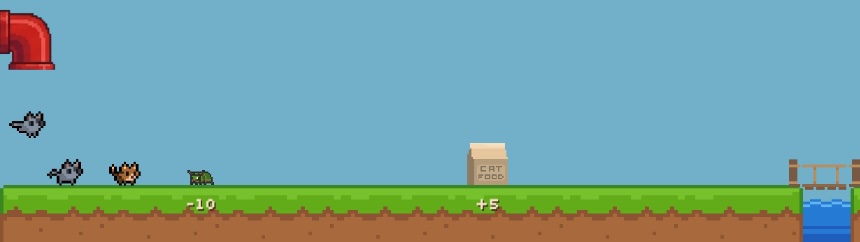
The subscription loop
Floof’s product is based on a classic 30-day subscription loop, where customers sign-up, experience some value, and hopefully renew 30 days later.
In Kitten PM, the product is represented by an arcade style track. And its customers are represented by kittens walking along the track and experiencing the product.
Kittens sign-up to your product via the pipe on the left, and walk left-to-right across the track encountering value or friction as they go.
Exactly 30 days later, they reach the bridge at the end of the track - if they’re happy they’ll renew and take another 30-day loop around the track. And if not, they’ll leave.
Product value & friction
Creating value is central to everything a product manager does.
In Kitten PM:
- Kitten happiness is the value a kitten gets from the product, minus any friction.
- Build features to create value (delight) for your kittens.
- Fix bugs and balance pricing to reduce friction.
The workshop
Your product team is managed via the workshop toolbar, which sits along the bottom of the screen. Here you can choose which features to build or bugs to fix.
As the game progresses additional buttons and controls appear, but at the start of the game it looks like this.
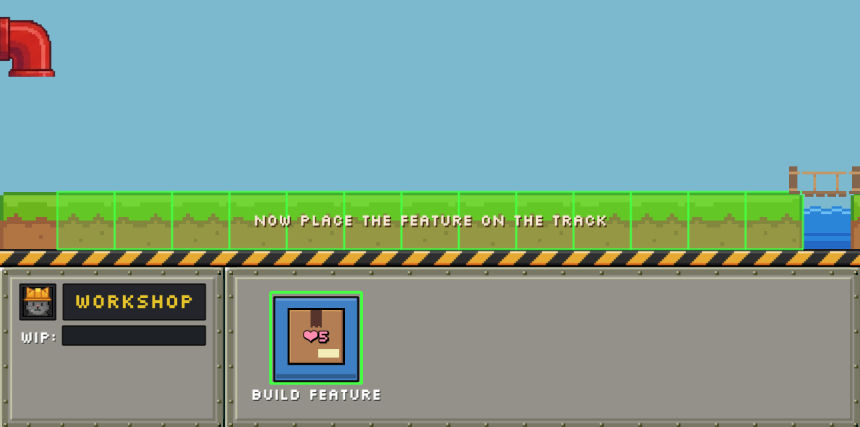
To build a feature, select the build icon, then select where on the track you’d like to place it. The work will be allocated to your team, and your feature will start building. Once complete, it will be added to the track for the kittens to experience.
- Different types of features generate different amounts of delight, this is represented by the heart value. At the start of the game all features generate 5 delight.
Work in progress
Your workshop has a finite work capacity, and this capacity is divided by whatever work is in progress. This means if you work on many things at the same time, it will take longer for each item to complete.
This is represented by the WIP (work in progress) bar on the left.
Game controls
Game controls can be found in the sky at the top of the game-space. Choose the speed that feels comfortable to you.
- Too fast? Press the paws button to take a pause - you can still control the workshop, and any other settings while the game is paused.
- Too slow? Use the speed button to toggle between 1x, 2x, & 4x speeds.
Product metrics
The panel at the right of the screen is the KPI panel. It shows the health of your product in real-time, so you can experiment with cause and effect and watch how the system responds.
Additional KPIs and controls are added as the game progresses, but at the very start of the game the following information is shown:
- Level number & name - make a note of the level name to load it at a later date from the main menu.
- Goal - Reach this objective to complete the level.
- Cash - How much cash Floof Inc. has in the bank. In this case, not much.
- MRR - monthly recurring revenue. How much revenue you are generating each month.
- Price - the price of your product. How much you are charging your kittens each month.
- Product - the net value that your product generates.
- Delight - the amount of delight that your product generates.
- Kittens - the number of customers in your product.
- Signup rate - the current speed of signups projected over 30 days. It answers “at today’s rate, how many kittens will arrive over the next month”.
- Satisfaction - a measure of how happy your customers are.
- Renewal rate - the percentage of kittens that renewed in the last 30 days.